
Dormant customers do not go quiet for one reason. Projects pause, contacts change, priorities shift, budgets move, or another supplier becomes easier to use. This playbook turns that uncertainty into a repeatable reactivation motion without making the customer feel like they have been dropped into an automated “please buy again” sequence.
Chady Mouawad · GTM & Growth Strategist · Updated September 2026
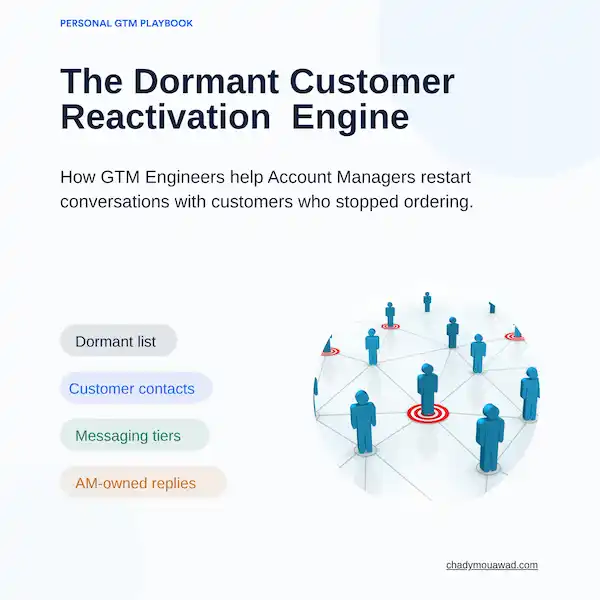
The job is to work out which dormant customers are still worth pursuing, what changed in the relationship, who matters now, and what kind of re-entry makes sense. From there, the system warms the account, tests engagement, routes the right offer and puts real replies back with the Account Manager.
Dormant accounts are often pulled into one list even though the reason they went quiet — and the value of winning them back — can be completely different.
Build the dormant list, analyse the account history, map and enrich the contacts, define the reactivation objective, warm the account, test engagement, activate the right offer and route replies back to the AM.
Reactivation should be repeatable without feeling automated. The previous relationship is the context, and the AM keeps ownership of the conversation.
Projects pause. Contacts change. Priorities shift. Budgets move. Sometimes another supplier simply becomes easier to use. That is why a dormant account cannot be treated like a cold prospect with an old email address.
The aim is to make reactivation repeatable without making it feel automated: define the dormant account list, map the contacts, segment the account, activate across the right channels, and make sure every meaningful response gets back to the Account Manager.
The system creates context and momentum. The Account Manager handles the relationship once the customer gives a reason to talk.
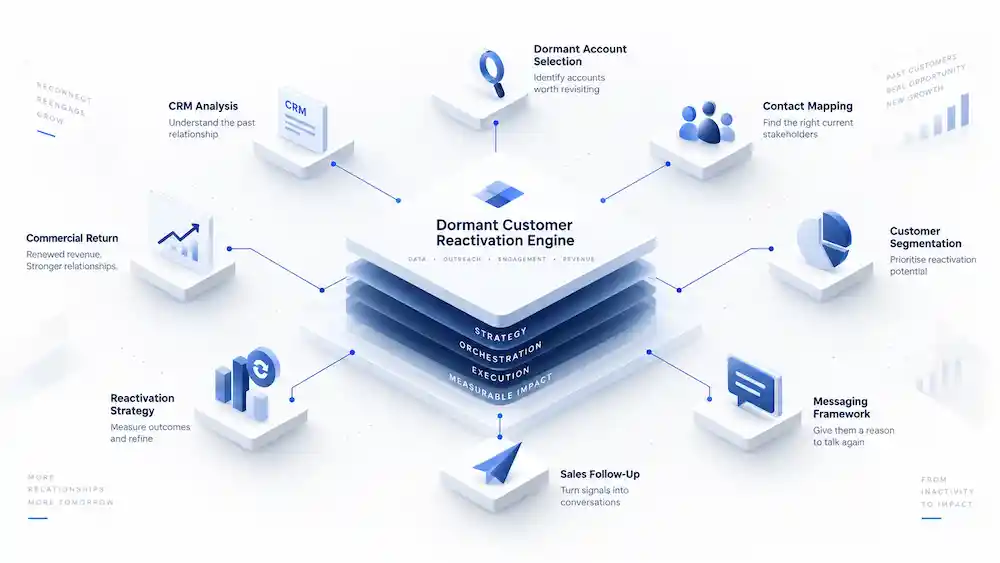
Use it when an existing customer has stopped ordering for long enough to be genuinely dormant, there is usable relationship history, and there is still a credible commercial reason to reconnect.
The playbook deliberately separates preparation, warming, outreach and reply handling. That keeps the motion selective and avoids treating every old customer record as a sales opportunity.
Define the dormant cohort, understand the account history and rebuild the contact picture before deciding how to re-engage.
Start with a definition the business can defend. The playbook uses existing-customer status, no order in roughly the last 6–12 months, an assigned Account Manager, and enough prior value or strategic fit to justify another attempt.
Customer status, last-order date, account owner, prior revenue, strategic fit and recent signals.
Apply the dormancy rule, then rank accounts as high, medium or low priority rather than treating the whole list equally.
A dormant account list with an owner and a clear priority.
AM role: Validate whether the account is truly dormant and whether the previous relationship still deserves attention.
Before launch, analyse historical CRM, web and ABM data. The objective is to understand what the account did before it went quiet and whether anything has changed since.
CRM history, past revenue, opportunities, web activity, ABM engagement and known relationship notes.
Build a short account view that separates useful history from stale data and highlights the strongest re-entry clues.
A pre-campaign account brief with history, recent behaviour and likely reactivation context.
AM role: Add the relationship context that never made it into the systems and flag accounts that should not be contacted.
Find the person previously engaged, the warm contacts already in the database, and any new stakeholder who may now own the next project. Dormant accounts often have dormant contact data too.
Known customers, past buyers, marketing-database leads, add-to-cart or engagement signals, and missing personas.
Classify people as Active Reactivation, Warm Reminder or New Stakeholders and identify the gaps.
A current reactivation contact map instead of a historic contact list.
AM role: Confirm who still has a relationship with the account and where the previous contact is no longer the right entry point.
Set one objective per segment, enrich the right contacts and build message tiers that reflect the reactivation context.
Before writing emails, decide what you are trying to learn or achieve with each segment. Active Reactivation, Warm Reminder and New Stakeholders should not be pushed toward the same conversation.
Contact segment, relationship history, previous engagement and known dormancy context.
Assign a clear reactivation objective to each segment before choosing channels or copy.
A segment-by-segment objective that guides message and follow-up.
AM role: Make sure the objective fits the relationship and does not overreach.
Update each tier before the campaign starts. The point is to avoid activating stale data and give the AM a clearer view of who is still relevant, who changed role and who should be contacted next.
Current role, email, LinkedIn, seniority, role changes, buying-committee fit, new contacts and contact details.
Refresh Active Reactivation contacts, detect changes in Warm Reminder contacts and fill the gaps for New Stakeholders.
A cleaner, current contact set ready for reactivation.
AM role: Validate role changes and remove contacts that would make the outreach feel careless.
Relationship stage and dormancy reason should change the message. Active Reactivation can ask what changed and whether new projects exist. Warm Reminder should educate and reduce friction. New Stakeholders need context without pressure.
Segment, account history, dormancy clues, new capabilities and current commercial context.
Build three message routes that reflect the relationship rather than forcing one generic sequence.
Tiered reactivation messaging for Active Reactivation, Warm Reminder and New Stakeholders.
AM role: Add the specific customer context and decide how direct the message can be.
Build the activation architecture, rebuild familiarity, score engagement and decide which offer is credible enough to reopen the conversation.
The point is not adding channels. Every channel should support the same reactivation objective and move the dormant account toward a real conversation.
LinkedIn ads, reactivation offer, message tiers, email outreach and AM follow-up.
Define the role of each channel and the handoff between paid warming, outreach and AM follow-up.
One coordinated reactivation motion instead of separate channel activity.
AM role: Own the human follow-up and keep the account history visible across channels.
Before direct outreach, remind dormant customers what has changed: updated capabilities, easier ways to work together, stronger support or another clear reason to reconnect.
Dormant account audiences, updated capabilities, support improvements and re-entry proof points.
Run LinkedIn account audiences that rebuild familiarity before the direct message arrives.
A warmer dormant-account audience with current reasons to reconsider the relationship.
AM role: Use the campaign as familiarity, not as evidence that the customer is ready to buy.
After the LinkedIn warm-up, separate real reaction from simple delivery. High engagement can include clicks, key-page visits, video views or ad interaction. Medium engagement is lighter. No engagement should not be forced into sales.
Ad clicks, key-page visits, video views, ad interaction, impressions and account fit.
Classify accounts by post-ad engagement and use that score to decide the next motion.
High, medium and no-engagement account groups for the next step.
AM role: Decide whether the observed engagement is meaningful enough to change the outreach plan.
Use webinar or event invites when there is a real reason. Use capability updates as the evergreen option when the account may simply not know what has changed since it last bought.
Engagement level, account context, upcoming events, webinars, capability changes and known customer needs.
Choose the re-entry offer that gives the account a credible reason to engage now.
A relevant reactivation offer matched to the account rather than a generic meeting request.
AM role: Confirm which offer feels credible given the previous relationship.
Launch contextual outreach, route replies back to the Account Manager and use the outcomes to improve the next reactivation cycle.
Once the account has been warmed, email outreach becomes more natural. The message should reference the previous relationship, ask what changed and make it easy to reconnect if new projects exist.
Message tier, account history, warm-up engagement, selected offer and current contact.
Launch the appropriate email sequence without pretending the customer is a cold prospect.
Contextual reactivation outreach tied to the account’s previous relationship.
AM role: Step in when context or history makes a personal message stronger than automation.
The reply type determines the next action. Positive replies go to the AM. ‘Not now’ becomes future follow-up. Wrong contacts update the CRM. Bad experiences stop automation and route to AM or support. Negative replies and unsubscribes are suppressed.
Reply type, CRM owner, account history, support context and suppression status.
Stop or adapt automation immediately and route the response to the right human owner.
A clear disposition for every reply and cleaner CRM data.
AM role: Own positive conversations, handle sensitive cases personally and protect trust.
Reporting is not there to prove activity. It should tell the team why customers went quiet, what brought some of them back and what to change in the next cycle.
Dormant accounts touched, replies, reasons captured, meetings, reopened opportunities and reactivated accounts.
Review coverage, conversation quality, learned dormancy reasons and commercial outcomes.
A better reactivation model and a cleaner view of dormant-customer potential.
AM role: Feed qualitative reasons back into the next selection and prioritisation cycle.
The PDF is explicit: reporting should improve the reactivation system, not prove that activity happened. I would keep the reporting view focused on coverage, learning and commercial outcome.
How many dormant accounts were touched, and how many relevant contacts were reached?
How many replies and meetings came back, and what did customers actually say?
Did we capture why accounts went quiet, wrong contacts, timing issues or bad experiences?
Which opportunities reopened and which accounts genuinely reactivated?
The playbook keeps the contact model simple so the message can change with the relationship.
Known customers or past buyers already in the CRM. The goal is to understand what changed and whether a new project exists.
Leads already in the marketing database, including past engagement or add-to-cart signals. Re-educate, remind and reduce friction.
Missing personas who may now own the next project. Reintroduce the company through the context of the account's previous relationship.
Download the original Dormant Customer Reactivation Engine PDF, or return to the GTM Playbooks library.